create_project_dirs <- function(type = c(1, 2), root = getwd()) {
if (type == 1) {
dirs <- c(
"data", "data/1-source", "data/2-aux", "data/3-final",
"output",
"scripts"
)
} else if (type == 2) {
dirs <- c(
"data", "data/1-source", "data/2-final",
"output",
"scripts"
)
} else {
stop("`type` must be 1 or 2")
}
dirs <- paste(root, dirs, sep = "/")
lapply(dirs, dir.create)
invisible(root)
}Reproducibility, organization, and documentation in R
Eliot Monaco
2024-09-09
What’s the problem?
Time and change
- When we’re immersed in an analysis, the methodology is never clearer
- Then things happen
- How do we ensure that we, or someone else, can run the analysis and get the same output?
What does it mean to be reproducible?
- Self-contained: all in one directory
- Portable: can be moved or copied without breaking it or changing the output
- Everything is in code: the analysis in run from scripts with nothing left out
- Everything is automated: minimal human intervention or decision-making
- Clearly ordered: no ambiguity which parts/which order to run everything
- Not dependent on you: can be executed successfully by someone unfamiliar with the project
- Consistent output: produces the same output regardless of time, place, or person
What do you need for reproducibility?
- Simple, predictable project organization
- Clear documentation
- Good habits, especially when beginning and when stepping away from (opening and closing?) a project
- Collectively, “housekeeping”
Projects & internal structure
Use RStudio projects
- Created to make R projects easy to organize and reproducible
- Group all project files in one directory
- Sets the working directory to the project directory
- Easily integrate versioning (git/GitHub)
- Necessary for using renv (package documentation)
- File > New Project
Parts of an analysis: Files
source data, final data, intermediate data,
other helpful data, analysis/processing scripts,
data viz script, custom function scripts,
script to load additional data, CSV output,
Excel output, HTML/XML/JSON output, plots,
tables, maps, reports, Rhistory, RData
File organization
my-project/
|-- .Rhistory
|-- analysis_script.R
|-- compare_outputs.R
|-- data.rds
|-- data_processing_script.R
|-- data1.rds
|-- data2.rds
|-- df.csv
|-- df1.rds
|-- df2.rds
|-- exploration.R
|-- notes.txt
|-- old_script.R
|-- original_script.R
|-- process_source_data.R
|-- report.Rmd
|-- workspace.RData
|-- workspace1.RData
my-project/
|-- data/
|   |-- 1-source/
|   |   |-- data1.rds
|   |   |-- data2.rds
|   |-- 2-final/
|       |-- data_final.rds
|-- output/
|   |-- plot1.png
|   |-- table1.csv
|   |-- table2.csv
|-- scripts/
    |-- 01_data_validation.Rmd
    |-- 02_data_processing.Rmd
|-- 03_data_viz.RmdGood project structure
- Consistent and predictable across similar projects
- Easily accommodates variation
- As simple as possible
Project structure example
my-project/
|
|-- data/
|   |-- 1-source/
|   |-- 2-aux/
|   |-- 3-final/
|
|-- output/
|
|
|-- scripts/
|
|
|-- my-project.Rproj
source data only (from outside the project)
intermediate/auxiliary data (everything else)
final data only (the end result(s) of the project)

non-native data products (for use outside of R)
 - CSV, XLSX, HTML, XML, etc.

code scripts for analysis, custom functions,
additional data, reports, etc.

the RStudio project file
Let a function do it for you
Within projects
Paths
Use paths that are relative and inward-pointing
Relative paths
- RStudio projects set the working directory to the project’s main directory by default
- Leave this alone, and use relative paths
- A relative path uses the working directory as the baseline
- An absolute path conveys the whole path explicitly
“C:/Users/Username/OneDrive/Documents/r_projects_folder/my_project” is implied in the relative path above
Inward-pointing paths
When you reference a file outside the project, it’s no longer self-contained
Why adhere to this?
- Changing the wd can cause confusion (errors?)
- If a change of wd is not written into the script, it will be difficult to track
- A change of wd takes the same time as typing a relative path, so…
- If your project is collaborative, e.g., via GitHub, relative inward-pointing paths are the only way to ensure paths work for everyone
- If a project is moved, or if files or folders change outside a project, outward-pointing paths will break
Markdown files
- For markdown files, including Quarto, the wd is the directory the markdown file is saved in.
- If analysis.Rmd is saved in my_project/scripts/, that is the wd for that file.
- To import data, I would need to go up a level, as in
my-project/                         the wd for the project
|
|-- data/
|   |-- 1-source/
|       |-- data_file.csv
|
|-- scripts/                        the wd for the RMD
        |-- analysis.Rmd
Scripts
- Number scripts in sequential order of execution
- e.g., 01_clean_data.R, 02_analyze_data.R, 03_create_plots.R
- Write scripts so that they can be executed from top to bottom (no skipping around)
- If the analysis is interactive, write every step into the code so that when it’s finished you can clear your environment, run the whole script at once (Ctrl + Alt + R), and get the same output
- Include a Purpose section for each script
Scripts
- Every time an object is brought into the global environment, it’s written in code
readRDS(),read.csv(), etc. for importing data fileslibrary(),p_load()for attaching packagessource()for scripts, e.g., those containing custom functions
A recommendation
Don’t save Rhistory or RData (workspace) files—everything should be possible to recreate from your scripts
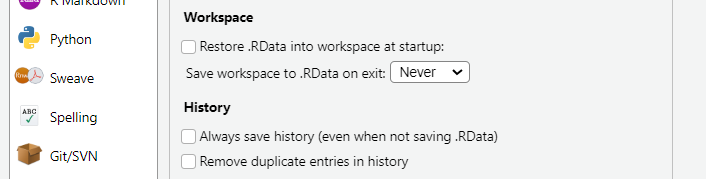
You can disable automatically saving these in Tools > Global Options > General
The code
- Human-readable code
- your future self and anyone who has to read your code with thank you
- Follow style conventions (e.g., tidyverse)
- Use styler from Addins or create an easy keyboard shortcut
- Tools > Modify Keyboard Shortcuts
- type “style” in search
- click in the Shortcut field and type the shortcut you want
- Risk over-commenting
- RMDs, QMDs, & notebooks combine code, code output, text/narrative, and reports all in one
The environment
Parts of an analysis: The environment
- Packages
- Base R - attached automatically
- Explicitly attached packages
- Custom packages
- R (version)
- Operating system
sessionInfo()
sessionInfo() captures a snapshot of your session
- R version
- package versions
- operating system
- and more
sessionInfo()
R version 4.4.0 (2024-04-24 ucrt)
Platform: x86_64-w64-mingw32/x64
Running under: Windows 11 x64 (build 22631)

Matrix products: default


locale:
[1] LC_COLLATE=English_United States.utf8  LC_CTYPE=English_United States.utf8    LC_MONETARY=English_United States.utf8
[4] LC_NUMERIC=C                           LC_TIME=English_United States.utf8

time zone: America/Chicago
tzcode source: internal

attached base packages:
[1] stats     graphics  grDevices utils     datasets  methods   base

loaded via a namespace (and not attached):
 [1] compiler_4.4.0    fastmap_1.2.0     cli_3.6.2         tools_4.4.0       htmltools_0.5.8.1 rstudioapi_0.16.0
 [7] yaml_2.3.8        rmarkdown_2.27    knitr_1.46        jsonlite_1.8.8    xfun_0.44         digest_0.6.35
[13] rlang_1.1.3       evaluate_0.23
sessionInfo()
You can print the output directly to a text file
renv is your friendv
- renv ensures that the packages used in your project are recorded
- It can save a library of packages within your project
- Or it can save a snapshot of the packages in a lockfile, from which you can recreate your project-specific package library
Set up renv
renv::init()
- Call within a project to start using renv
- Creates a project-specific package library in renv/
- Creates a lockfile (renv.lock) that records the project state including packages
- Creates .Rprofile to make sure renv runs in all future sessions
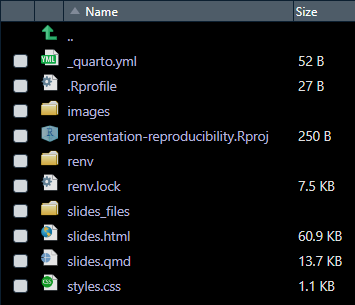
Update (or record) the project state
renv::snapshot()
- Call to update the lockfile if you change something, e.g., attach new packages
- This can be done anytime after calling
renv::init() - It can also be done without ever calling
renv::init()(a lightweight option)
Restore a project state
renv::restore()
- Call to recreate/restore the project-specific library from a lockfile
- Great when collaborating, e.g., over GitHub, or restoring an archived project
- This will not restore the R version, just packages
More renv
renv::activate()
- Call to enable renv (if not already activated)
- e.g., if only a lockfile exists because
renv::init()was never called, do this beforerenv::restore()
renv::status()
- Call to report problems: packages used but not installed, installed but not used, version out of sync
renv::deactivate()
- Call to deactivate renv
- arg
clean = TRUEwill remove the library and lockfile
The renv workflow
- Option 1: create a project library
- Call
renv::init()at any time - Call
renv::snapshot()when you’re finished
- Call
- Option 2: create a lockfile only
- Call
renv::snapshot()when you’re finished
- Call
Outside of R
What is not reproducible?
…in the sense that you have control over how the data is modified and can replicate it anytime
- Create a table in R. Export the table to a spreadsheet in Excel. Make manual changes to the Excel document. Import the data back into R.
- Process some data in R. Run that data through an app or API outside of your RStudio project. Import the modified data back into R.
Parts of an analysis: Beyond R
Includes using:
- APIs
- Shiny apps
- Other files and software
- Or anything outside of R used to modify data
Handling irreproducibility
- Some things have to happen outside of R!
- Document with narrative what has happened to the data
- Save the exported (unmodified) data and imported (modified) data separately
Do we have time?
Document custom functions
- Keep custom functions in separate scripts and use
source() - Use package names in function calls if not base R (
package::function()) - Describe the function arguments, expected input and output
- Comment within the function itself
- Use roxygen2 style documentation
When is a project over?
- Resist project bloat
- Repeated analyses (monthly, quarterly, annually) should each be a new project
- You can always make the final data of one project the source data of another
What did I miss?
- Setting a seed for random number generation (see Geeks for Geeks)
- I avoided talking about version control because that’s its own huge topic… tl;dr it’s a good idea
- Tracking custom packages with renv